Sunday, 10 January 2016

Templates in C++ Programming

Templates in C++ programming allows function or class to work on different data types without writing different codes for different data types. Templates are often used in larger software and program for the purpose of code reusability and flexibility of program.

Function Templates

A function templates works in similar manner as function except a single function template can work on different types but, different functions are needed to perform identical task on different data. If you need to perform identical operations on two or more types of data then, you can use function overloading. But, the better approach would be to use function templates because you can perform this task by writing less code and code is easier to maintain.

How to define function template?

A function template starts with keyword template followed by template parameter/s inside  < > which is followed by function declaration.
template <class T>
 T some_function(T arg)
{
   .... ... ....
}
In above code, T is a template argument and class is a keyword. You can use keyword typename instead of class in above example. When, an argument is passed to some_function( ), compiler generates new version of some_function() to work on argument of that type.

Example of Function Template


/* C++ program to display larger number among two numbers using function templates. */
/* If two characters are passed to function template, character with larger ASCII value is displayed. */

#include <iostream>
using namespace std;
template <class T>
T Large(T n1, T n2)
{
 return (n1>n2) ? n1:n2;
}
int main()
{
 int i1, i2;
 float f1, f2;
 char c1, c2;
 cout<<"Enter two integers: ";
 cin>>i1>>i2;
 cout<<Large(i1, i2)<<" is larger.";
 cout<<"\n\nEnter two floating-point numbers: ";
 cin>>f1>>f2;
 cout<<Large(f1, f2)<<" is larger.";
 cout<<"\n\nEnter two characters: ";
 cin>>c1>>c2;
 cout<<Large(c1, c2)<<" has larger ASCII value.";
 return 0;
}

Explanation
In this program, data of three different types: int, float and char is passed to function template and this template returns the larger of two data passed. In function template data type is represented by name: T in above example. During run-time, when integer data is passed to template function then, compiler knows the type to use is int. Similarly, when floating-point data and char data is passed, it knows the type to use is float and char respectively. After knowing the information of a type, it generates the specific version of Large( ) to work for that type.

Example to Swap Datas Using Concept of Templates


/* C++ program to swap datas entered by user. */

#include <iostream>
using namespace std;
template <typename T>
void Swap(T &n1, T &n2)
{
 T temp;
 temp = n1;
 n1 = n2;
 n2 = temp;
}

int main()
{
 int i1=1, i2=2;
 float f1=1.1, f2=2.2;
 char c1='a', c2='b';
 cout<<"Before passing data to function template.\n";
 cout<<"i1="<<i1<<"\ni2="<<i2;
 cout<<"\nf1="<<f1<<"\nf2="<<f2;
 cout<<"\nc1="<<c1<<"\nc2="<<c2;

 Swap(i1, i2);
 Swap(f1, f2);
 Swap(c1, c2);

        cout<<"\n\nAfter passing data to function template.\n";
 cout<<"i1="<<i1<<"\ni2="<<i2;
 cout<<"\nf1="<<f1<<"\nf2="<<f2;
 cout<<"\nc1="<<c1<<"\nc2="<<c2;
 return 0;
}
Output
Before passing data to function template.
i1=1
i2=2
f1=1.1
f2=2.2
c1=a
c2=b

After passing data to function template.
i1=2
i2=1
f1=2.2
f2=1.1
c1=b
c2=a

Sunday, 5 July 2015

Extracting information from URL address

Problem Statement:
Gaurav Singhal is making a web application in which he has to get the details like login id, password. He uses HTML and servlet for this purpose. Well the purpose is solved but as Gaurav Singhal was very curious that, how does the function "String getParameter(String)" works.
He decided to make a program to to extract the HTML form data.

Ex:
"http://www.krazyGaurav.com/signup/service?username=test&pwd=test&profile=developer&role=ELITE&key=manager";

Solution:
Username: test
Password: test
Profile: developer
Role: ELITE
Key: manager

Try to solve the problem on your own, minimize your browser and give it a try.


Source Code:

import java.util.Scanner;
class GauravSinghal{
public static void main(String args[]){
Scanner sc = new Scanner(System.in);
String url = sc.next();

String username,pwd,profile,role,key;
username = url.substring(url.indexOf("?username=")+10,url.indexOf("&pwd="));
pwd = url.substring(url.indexOf("&pwd=")+5,url.indexOf("&profile="));
profile = url.substring(url.indexOf("&profile=")+9,url.indexOf("&role="));
role = url.substring(url.indexOf("&role=")+6,url.indexOf("&key="));
key = url.substring(url.indexOf("&key=")+5,url.length()-1);
System.out.println("username: "+username);
System.out.println("pwd: "+pwd);
System.out.println("profile: "+profile);
System.out.println("role: "+role);
System.out.println("key: "+key);
}
}

Thursday, 6 February 2014

Merging of two Binary Search Trees

#include<stdio.h>
#include<stdlib.h>
typedef struct
{
    int info;
    struct node *left,*right;
}node;
node* insert(node *root, int info)
{
    if(root == NULL)
    {
        root = (node*)malloc(sizeof(node));
        root->left=root->right = NULL;
        root->info = info;
    }
    else if(root->info > info)
        root->left = insert(root->left, info);
    else
        root->right = insert(root->right, info);
    return root;
}
void inorder(node *root)
{
    if(root != NULL)
    {
        inorder(root->left);
        printf("%d\t",root->info);
        inorder(root->right);
    }
}
node* merge(node *root, node *root1)
{
    if(root!=NULL)
    {
        root->left=merge(root->left, root1);
        root->right=merge(root->right, root1);
        root1 = insert(root1, root->info);
        root = NULL;
        free(root);
    }
    return root;
}
int main()
{
    int i=0, element=0;
    char ans='Y';
    node *root1=NULL,*root2=NULL;

    //input in bst1
    printf("Enter elements in BST 1\n");
    while(ans == 'y' || ans == 'Y')
    {
        printf("Enter element: ");
        scanf("%d",&element);
        root1 = insert(root1, element);
        printf("do u want to add more element[Y/N]: ");
        fflush(stdin);
        ans = getchar();
    }
    ans = 'Y';
    i = 0;
    printf("\nEnter element  in BST 2\n");
    while(ans == 'y' || ans == 'Y')
    {
        printf("Enter element: ");
        scanf("%d",&element);
        root2 = insert(root2, element);
        printf("do u want to add more element[Y/N]: ");
        fflush(stdin);
        ans = getchar();
    }
    printf("Tree1\n");
    inorder(root1);
    printf("\nTree2\n");
    inorder(root2);

    printf("\n\n\nMerged tree is\n");
    root2 = merge(root2, root1);
    inorder(root1);
    inorder(root2);

    return 0;
}

Wednesday, 16 October 2013

Weighty Matters

Amdocs Code Mania 2013
Weighty Matters

Lalu owns a shop that sells weighing scales (see figure alongside) and weights. All the scales in his shop weigh the same – ten kilograms. They are of high quality and are well calibrated such that when equal weights are placed on both sides, they balance correctly. During his free time, Lalu imagines a grand tower made of many scales placed on one another as well as weights placed on some of them. He imagines the challenge it would pose to balance the entire tower! Your aim is to write a program to help Lalu balance any tower configuration by adding minimum weights on some scales. The balancing is always done by adding additional weights on lower scales and not by adding additional scales.


Souce Code...... of this . Weighty Matters is follows... 
#include<stdio.h>
#include<stdlib.h>
#include<string.h>

struct node

{
int lindex,rindex;
int lwt,rwt;
int a,la,ra;
int flag;
};
void calculate(struct node *n,int index);
int main(int argc,char *argv[])
{
int wt,no,scale;
int put,position;
struct node *n;
int i=0,max=0;
char ch;
char input[30],output[30];
FILE *fp,*fp1;
strcpy(input,argv[1]);
strcpy(output,argv[2]);
fp = fopen(input,"r");
fp1 = fopen(output,"w+");
if(!fp || !fp1)
    {
        printf("File error");
        return 1;
    }
fscanf(fp,"%d",&no);
n = malloc(sizeof(struct node)*no);
max = no*2;
ch = fgetc(fp);
int flag = 0;
int j;
for(j=0;j<no;j++)
{
n[j].lindex=n[j].rindex=n[j].lwt=n[j].rwt=n[j].flag = -1;
n[j].a=n[j].la=n[j].ra=0;
}
while(i<max)
{
flag = 0;
fscanf(fp,"%d",&wt);
if((ch = fgetc(fp))==32)
{
fscanf(fp,"%d",&scale);
flag = 1;
}
else
fseek(fp,-1,SEEK_CUR);
if(i%2==0)
{
n[i/2].lwt = wt;
if(flag == 1)
n[i/2].lindex = scale;
}
else if(i%2 ==1)
{
n[i/2].rwt = wt;
if(flag == 1)
n[i/2].rindex = scale;
}

ch = fgetc(fp);

i++;
}
calculate(n,0);

for(j=0;j<no;j++)

{
fprintf(fp1,"%d ",j);
fprintf(fp1,"%d ",n[j].la);
fprintf(fp1,"%d\n",n[j].ra);
}
close(fp);
close(fp1);
return 0;
}
void calculate(struct node *n,int index)
{
if(n[index].flag == 1)
return;
if(n[index].lindex != -1)
{
calculate(n,n[index].lindex);
}
if(n[index].rindex != -1)
{
calculate(n,n[index].rindex);
}
if(n[index].flag == -1)
{
n[index].flag = 1;
int left,right;
if(n[index].lindex != -1)
left = n[index].lwt + n[n[index].lindex].a;
else
left = n[index].lwt;
if(n[index].rindex != -1)
right = n[index].rwt + n[n[index].rindex].a;
else
right = n[index].rwt;
if(left > right)
{
n[index].ra = left-right;
n[index].a = 10 + left + right + n[index].ra;
}
else if(left <= right)
{
n[index].la = right - left;
n[index].a = 10 + left + right + n[index].la;
}

}

}


this is Weighty Matters

Tuesday, 10 September 2013

The Banker's Algorithm for Detecting/Preventing Deadlocks

#include<stdio.h>
#include<iostream.h>

#define true 1
#define false 0

typedef struct process
{
int alloc[4],max[4],curneed[4];
int finish;
};
int main()
{
process p[5];
int res,n,i,j,avail[4];
cout<<"Enter no of process: ";
cin>>n;
cout<<"Enter no of Resources: ";
cin>>res;
for(i=0;i<n;i++)
{
cout<<"Enter Allocations of Resources for process "<<i+1<<"\n";
for(j=0;j<res;j++)
{
cout<<"Resource "<<j+1<<": ";
cin>>p[i].alloc[j];
}
for(j=0;j<res;j++)
{
cout<<"Maximum Need "<<j+1<<": ";
cin>>p[i].max[j];
p[i].curneed[j]=p[i].max[j]-p[i].alloc[j];
}
p[i].finish = false;
}
cout<<"Enter the resouces available: "<<endl;
for(i=0;i<res;i++)
{
cout<<"Resources "<<i+1<<": ";
cin>>avail[i];
}
cout<<"Printing Details\n\n";
for(i=0;i<n;i++)
{
for(j=0;j<res;j++)
cout<<p[i].alloc[j]<<"  ";
cout<<"\t";
for(j=0;j<res;j++)
cout<<p[i].max[j]<<"  ";
cout<<"\t";
for(j=0;j<res;j++)
cout<<p[i].curneed[j]<<"  ";
cout<<"\t";
cout<<"\n";
}

//calculations
int flag,process_flag=true;
int no=0;
int count = 0;
while(process_flag)
{
count++;
  for(i=0;i<n;i++)
  {
  count++;
    flag = true;
    if(p[i].finish == false)
    {

count++;
for(j=0;j<res;j++)
{
count++;
if(p[i].curneed[j] > avail[j])
{
count++;
flag = false;
break;
}
}
if(flag == true)
{
count++;
for(j=0;j<res;j++)
{
avail[j] += p[i].alloc[j];
count++;
}
p[i].finish = true;
no++;
process_flag = false;
}
    }
  }
  if((process_flag == false) && (no!=n))
  {
process_flag = true;
count++;
  }
}
if(no == n)
cout<<"\n\n\nSAFE"<<count;
else
cout<<"\n\n\nNOT SAFE"<<count;
return 0;
}

Shortest Job First Preemptive Program in C

#include<stdio.h>
#include<iostream.h>

typedef struct process
{
int at,bt,wt;
}Process;
void sortProcess(Process p[],int n)
{
int i,j;
for(i=0;i<n-1;i++)
for(j=0;j<n-i-1;j++)
if(p[j].at > p[j+1].at)
{
Process temp = p[j];
p[j] = p[j+1];
p[j+1] = temp;
}
}
int get_minBT(Process p[],int n,int time)
{
int index=0,i;
int min = 32000;
for(i=0; i<n && p[i].at<=time ;i++)
{
if(p[i].bt<min && p[i].bt!=0)
{
min = p[i].bt;
index = i;
}
}
return index;
}

int main()
{
int i,j,n,ttime=0;
Process p[10];
cout<<"Enter the no. of processes: ";
cin>>n;
for(i=0;i<n;i++)
{
cout<<"Process "<<i+1<<endl;
cout<<"Arrivl Time: ";
cin>>p[i].at;
cout<<"Burst Time: ";
cin>>p[i].bt;
p[i].wt = 0;
ttime += p[i].bt;
}
sortProcess(p,n);

int time;
for(time = 0;time<ttime;time++)
{
int index = get_minBT(p,n,time);
p[index].bt--;

for(i=0;i<n && p[i].at<=time;i++)
{
if(i!=index && p[i].bt!=0)
p[i].wt++;
}
}

int btotal=0;
for(i=0;i<n;i++)
btotal += p[i].wt;
cout<<endl<<"Total Waiting  time: "<<btotal;
cout<<endl<<"Average Waiting time: "<<btotal/n;

return 0;
}

Wednesday, 7 August 2013

Vigenere Decrypt

#include<stdio.h>
#include<stdlib.h>
#include<string.h>

int main()
{
    int k,j,i,len,cnt,flag=0;
    char message[200],key[20];
    printf("Enter the Secret Key: ");
    fflush(stdin);
    gets(key);

    //check for valid key
    for(j=0;key[j]!=0;j++)
    {
        if((key[j]>=97 && key[j]<=122))
            key[j]=key[j]-32;
        else if((key[j]>=65 && key[j]<=90))
        {}
        else
        {
            printf("Keyword must only contain letters A-Z and a-z");
            return 1;
        }
    }
    len=strlen(key);
    printf("Enter Secret Message Here: ");
    fflush(stdin);
    gets(message);

    cnt = 0;
    for(i = 0;i < strlen(message);i++)
    {
        flag=0;
        k=key[cnt]-65;
    if( (message[i]>=65 && message[i]<=90) )
   {
   for(j=1;j<=k;j++)
   {
    if(message[i]>=65 && message[i]<=90)
    {
    if(message[i]!=65)
    message[i]-=1;
    else
    message[i]='Z';
    }
    else
    message[i]='Z'-1;
   }
   flag=1;
   }
   else if(message[i]>=97 && message[i]<=122)
   {
   for(j=1;j<=k;j++)
   {
    if( (message[i]>=97 && message[i]<=122) )
    {
    if(message[i]!=97)
    message[i]-=1;
    else
      message[i]='z';
    }
    else
    message[i]='z'-1;
   }
   flag=1;
    }
    if(flag==1)
    {
       if(cnt==len-1)
           cnt=0;
       else
           cnt++;
    }
    }
    printf("Original Message: %s\n",message);
    return 0;
}

Vigenere Encryption

#include<stdio.h>
#include<stdlib.h>
#include<string.h>

int main()
{
    int k,i,j,len,cnt,flag=0;
    char message[200], key[20];
    printf("Enter the Secret Key: ");
    fflush(stdin);
    gets(key);

    //check for valid key
    for(j=0;key[j]!=0;j++)
    {
        if((key[j]>=97 && key[j]<=122))
            key[j]=key[j]-32;
        else if((key[j]>=65 && key[j]<=90))
        {}
        else
        {
            printf("Keyword must only contain letters A-Z and a-z");
            return 1;
        }
    }
    len=strlen(key);
    printf("Enter Message Here: ");
    fflush(stdin);
    gets(message);

    cnt = 0;
    for(i = 0;i < strlen(message);i++)
    {
        flag=0;
        k=key[cnt]-65;
    if( (message[i]>=65 && message[i]<=90) )
   {
   for(j=1;j<=k;j++)
   {
    if(message[i]>=65 && message[i]<=90)
    {
    if(message[i]!=90)
    message[i]+=1;
    else
    message[i]='A';
    }
    else
    message[i]='A'+1;
   }
   flag=1;
   }
   else if(message[i]>=97 && message[i]<=122)
   {
   for(j=1;j<=k;j++)
   {
    if( (message[i]>=97 && message[i]<=122) )
    {
    if(message[i]!=122)
    message[i]+=1;
    else
      message[i]='a';
    }
    else
    message[i]='a'+1;
   }
   flag=1;
    }
    if(flag==1)
    {
       if(cnt==len-1)
           cnt=0;
       else
           cnt++;
    }
    }
    printf("Encrypted Message: %s\n",message);
    return 0;
}

Caesar Cipher Decryption

#include<stdio.h>
#include<stdlib.h>
#include<string.h>

int main(int argc,char* argv[])
{
    int key,j,i;
    char message[200];
    printf("Enter the secret key: ");
    scanf("%d",&key);
    if(key < 0)
    {
        printf("Invalid Key..");
        return 1;
    }
    key = key % 26;
    fflush(stdin);
    printf("Enter Secret Message: ");
    fflush(stdin);
    gets(message);

    for(i = 0;i < strlen(message);i++)
    {
    if( (message[i]>=65 && message[i]<=90) )
   {
   for(j=1;j<=key;j++)
   {
    if(message[i]>=65 && message[i]<=90)
    {
    if(message[i]!=65)
    message[i] -= 1;
    else
    message[i] = 'Z';
    }
    else
    message[i]='Z' - 1;
   }
        }
        else if(message[i]>=97 && message[i]<=122)
        {
   for(j=1;j<=key;j++)
   {
    if( (message[i]>=97 && message[i]<=122) )
    {
    if(message[i] != 97)
    message[i] -= 1;
    else
      message[i] = 'z';
    }
    else
    message[i] = 'z' - 1;
   }
    }
    }
    printf("Message is: %s\n",message);
    return 0;
}

Caesar Cipher Encryption

#include<stdio.h>
#include<stdlib.h>
#include<string.h>

int main(void)
{
    int key,j,i;
    char message[200];
    printf("Enter the Secret Key: ");
    scanf("%d",&key);
    if (key < 0)
    {
        printf("Worng key entered\n");
        return 1;
    }
    key = key % 26;
    printf("Enter Message here: ");
    fflush(stdin);
    gets(message);
    for(i = 0;i < strlen(message);i++)
    {
    if( (message[i]>=65 && message[i]<=90) )
   {
   for(j=1;j<=key;j++)
   {
    if(message[i]>=65 && message[i]<=90)
    {
    if(message[i]!=90)
    message[i]+=1;
    else
    message[i]='A';
    }
    else
    message[i]='A'+1;
   }
}
else if(message[i]>=97 && message[i]<=122)
{
   for(j=1;j<=key;j++)
   {
    if( (message[i]>=97 && message[i]<=122) )
    {
    if(message[i]!=122)
    message[i]+=1;
    else
      message[i]='a';
    }
    else
    message[i]='a'+1;
   }
    }
    }
    printf("Encrypted Message: %s\n",message);
    return 0;
}

Monday, 22 July 2013

Inheritance in C++ Programming

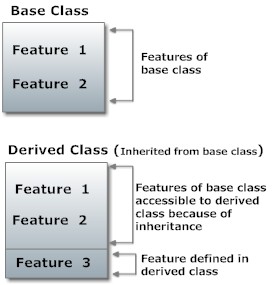
Inheritance is one of the key feature of object-oriented programming including C++ which allows user to create a new class(derived class) from a existing class(base class).  The derived class inherits all feature from a base class and it can have additional features of its own.

Inheritance feature in object oriented programming including C++.

Concept of Inheritance in OOP

Suppose, you want to calculate either area, perimeter or diagonal length of a rectangle by taking data(length and breadth) from user. You can create three different objects( Area, Perimeter and Diagonal) and asks user to enter length and breadth in each object and calculate corresponding data. But, the better approach would be to create a additional object Rectangle to store value of length and breadth from user and derive objects Area, Perimeter and Diagonal from Rectangle base class. It is because, all three objects Area, Perimeter and diagonal are related to object Rectangle and you don't need to ask user the input data from these three derived objects as this feature is included in base class.

Visualization of a program using inheritance feature in C++ Programming

Implementation of Inheritance in C++ Programming

class Rectangle 
{
  ... .. ...
};

class Area : public Rectangle 
{
  ... .. ...
};

class Perimeter : public Rectangle
{
  .... .. ...
};
In the above example, class Rectangle is a base class and classes Area and Perimeter are the derived from Rectangle. The derived class appears with the declaration of class followed by a colon, the keyword public and the name of base class from which it is derived.
Since, Area and Perimeter are derived from Rectangle, all data member and member function of base class Rectangle can be accessible from derived class.
Note: Keywords private and protected can be used in place of public while defining derived class(will be discussed later).

Source Code to Implement Inheritance in C++ Programming

This example calculates the area and perimeter a rectangle using the concept of inheritance.

/* C++ Program to calculate the area and perimeter of rectangles using concept of 
inheritance. */
#include <iostream>
using namespace std;
class Rectangle
{
    protected:
       float length, breadth;
    public:
        Rectangle(): length(0.0), breadth(0.0)
        {
            cout<<"Enter length: ";
            cin>>length;
            cout<<"Enter breadth: ";
            cin>>breadth;
        }
};
/* Area class is derived from base class Rectangle. */
class Area : public Rectangle   {
    public:
       float calc()
         {
             return length*breadth;
         }
};
/* Perimeter class is derived from base class Rectangle. */
class Perimeter : public Rectangle
{
    public:
       float calc()
         {
             return 2*(length+breadth);
         }
};
int main()
{
     cout<<"Enter data for first rectangle to find area.\n";
     Area a;
     cout<<"Area = "<<a.calc()<<" square meter\n\n";

     cout<<"Enter data for second rectangle to find perimeter.\n";
     Perimeter p;
     cout<<"\nPerimeter = "<<p.calc()<<" meter";
     return 0;
}
Output
Enter data for first rectangle to find area.
Enter length: 5
Enter breadth: 4
Area = 20 square meter

Enter data for second rectangle to find perimeter.
Enter length: 3
Enter breadth: 2
Area = 10 meter
Explanation of Program
In this program, classes Area and Perimeter are derived from class Rectangle. Thus, the object of derived class can access the public members of Rectangle. In this program, when objects of class Area and Perimeter are created, constructor in base class is automatically called. If there was public member function in base class then, those functions also would have been accessible for objects a and p.

Keyword protected


In this program, length and breadth in the base class are protected data members. These data members are accessible from the derived class but, not accessible from outside it. This maintains the feature of data hiding in C++ programming. If you defined length and breadth as private members then, those two data are not accessible to derived class and if defined as public members, it can be accessible from both derived class and from main( ) function.
Accessbility private protected public
Accessible from own class ? yes yes yes
Accessible from dervied class ? no yes yes
Accessible outside dervied class ? no no yes

Member Function Overriding in Inheritance

Suppose, base class and derived class have member functions with same name and arguments. If you create an object of derived class and write code to access that member function then, the member function in derived class is only invoked, i.e., the member function of derived class overrides the member function of base class.

Sunday, 24 March 2013

C++ Program to Subtract Complex Number Using Operator Overloading

In this tutorial, subtraction - operator is overloaded to perform subtraction of a complex number from another complex number. Since - is a binary operator( operator that operates on two operands ), one of the operands should be passed as argument to the operator function and the rest process is similar to the overloading of unary operators.

Binary Operator Overloading to Subtract Complex Number


/* C++ program to demonstrate the overloading of binary operator by subtracting one complex number from another. */

#include <iostream>
using namespace std;
class Complex
{
    private:
      float real;
      float imag;
    public:
       Complex(): real(0), imag(0){ }
       void input()
       {
           cout<<"Enter real and imaginary parts respectively: ";
           cin>>real;
           cin>>imag;
       }
       Complex operator - (Complex c2)    /* Operator Function */
       {
           Complex temp;
           temp.real=real-c2.real;
           temp.imag=imag-c2.imag;
           return temp;
       }
       void output()
       {
           if(imag<0)
               cout<<"Output Complex number: "<<real<<imag<<"i";
           else
               cout<<"Output Complex number: "<<real<<"+"<<imag<<"i";
       }
};
int main()
{
    Complex c1, c2, result;
    cout<<"Enter first complex number:\n";
    c1.input();
    cout<<"Enter second complex number:\n";
    c2.input();
/* In case of operator overloading of binary operators in C++ programming, the object on right hand side of operator is always assumed as argument by compiler. */    
    result=c1-c2; /* c2 is furnised as an argument to the operator function. */
    result.output();
    return 0;
}

Explanation
In this program, three objects of type Complex is created and user is asked to enter the real and imaginary parts for two complex numbers which is stored in objects c1 and c2. Then statement result=c1-c2 is executed. This statement invokes the operator function Complex operator - (Complex c2). When result=c1-c2 is executed, c2 is passed as argument to the operator function. In case of operator overloading of binary operators in C++ programming, the object on right hand side of operator is always assumed as argument by compiler. Then, this function returns the resultant complex number(object) to main() function and then, it is displayed.
Though, this tutorial contains the overloading of - operators, binary operators in C++ programming like: +, *, <, += etc. can be overloaded in similar manner.